
How is TermBoy installed?
TermBoy can be implemented in three ways:
1. On TTN’s web pages (basic, always included). TermBoy is installed on TTN’s web pages in every case and can be accessed via dedicated pages. The pages installed at TTN also serve to maintain the terminology and ensure that the information can be accessed by translators at any time.
2. On your own internet server (for a surcharge). TTN sets up a standalone website for you — for example AutoTerm.tech — on which the terminology can be accessed as a standalone site. This model is suited above all to larger terminology databases built up jointly by several organisations.
3. As a plugin on your own website (for a surcharge). The visibility of your own website is only improved if TermBoy is installed on your site. All common CMS platforms have a plugin system; TermBoy generates a plugin for you designed specifically for your site.
The plugin contains a page on which the results from the terminology database are displayed. The data itself resides on a TTN database server in Geneva and is retrieved on demand. At regular intervals the plugin generates a sitemap file containing all the terms. The sitemap is embedded in the robots.txt file — so Google, Bing, ClaudeBot, GPTBot and other crawlers find your terms and read them in.
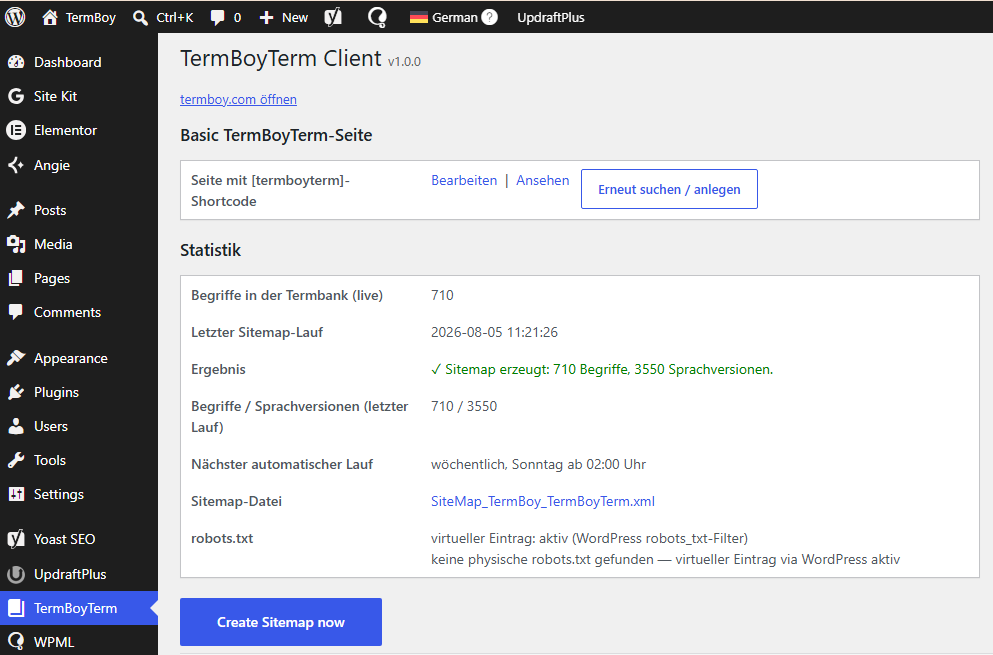
The screenshot shows the plugin for WordPress. The dedicated interface lets you define numerous parameters.
How do search engines find your TermBoy terms?
The plugin automatically generates a sitemap containing all published terms and enters it in your robots.txt file. The robots.txt is read by all search engines and serves as a guide for indexing the pages:
User-agent: *
Disallow:
Sitemap: https://www.termboy.com/sitemap_index.xml
Sitemap: https://www.termboy.com/wp_content/uploads/termboyterm/SiteMap_TermBoy_TermBoyTerm.xml
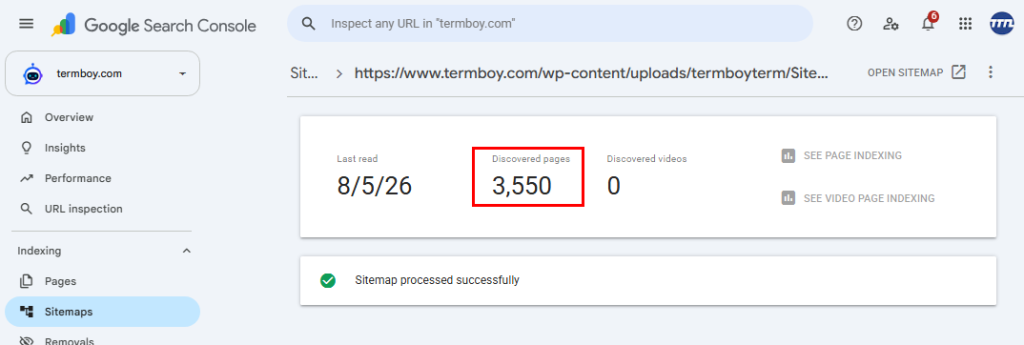
Each term is given its own indexable internet address per language. After installation you can check the number of links published in the sitemap at any time, for example in the Google Search Console:
How does the generated page appear?
You have a choice between two presentations:
- Embedded: the glossary page is integrated into your website’s theme — header, menu and footer are retained, only the content comes from the plugin.
- Standalone: the page appears as a full page in the TermBoy design.
In both cases, separate pages are created per term and language that can be linked, shared and indexed by search engines.
Does the plugin slow down my website?
No. Your website continues to serve its own pages; the terminology data is only retrieved from the TTN server on demand. The sitemap is generated in the background on a schedule (by default once a week).
How is the plugin updated?
The plugin updates itself: it regularly checks whether a new version is available and installs it like an ordinary CMS update. You don’t have to worry about anything.
Where is the data — and how secure is it?
All terminology data resides on TTN servers in Geneva (Switzerland). TTN is certified to ISO 27001; the transmission between your website and the TTN server is encrypted. Internal terms not intended for publication never leave the translation environment.